
Protecting Your Privacy on Social Media Platforms
- Kate

- 2 days ago
- 2 min read
Introduction
Social media makes it easy to connect and share, but it also comes with privacy risks. Cybercriminals, advertisers, and even strangers can misuse personal information if it's not protected. Many users unknowingly expose sensitive details, making them vulnerable to hacking, phishing, and fraud. To stay safe, it's essential to adjust privacy settings, be cautious about what you share, and follow best practices for securing your accounts. Here are key guidelines to help you manage your privacy and share information safely online.
Guidelines to help Safeguard your Personal Information
Step 1: Adjust your Privacy Settings
Social media platforms offer privacy settings that help control who can see your posts, personal details, and activity. Regularly reviewing and updating these settings reduces the risk of exposing sensitive information to strangers.
How to do it:
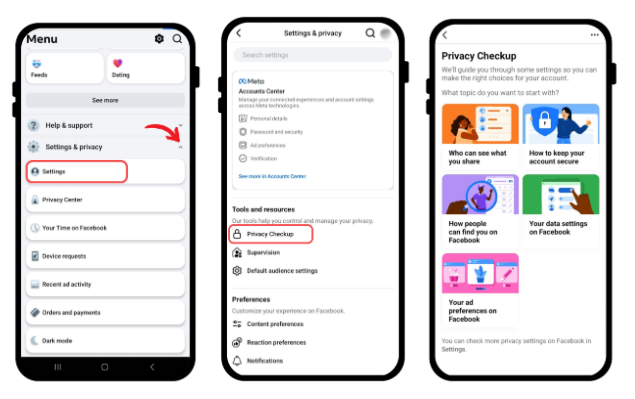
On Facebook, go to Settings & Privacy > Privacy Checkup and customize who can see your posts, friends list, and personal details.
On Instagram, switch to a private account under Settings > Privacy > Account Privacy.

On Twitter/X, enable Protect Your Tweets under Settings > Privacy and Safety.

On TikTok, set your account to Private under Privacy > Discoverability.

Step 2: Be Mindful of the Information you share
Even seemingly harmless posts can reveal personal details that cybercriminals or data brokers can exploit. Avoid sharing private information such as your home address, phone number, vacation plans, or financial details.

Step 3: Strengthen Passwords and Enable Two-Factor Authentication (2FA)
A strong password combined with two-factor authentication (2FA) adds an extra layer of security to prevent unauthorized access. Unique passwords should be used for each account, and 2FA helps protect against hacking attempts.

Step 4: Be Cautious with Friend Requests and Messages
Not all friend requests or messages come from legitimate users. Scammers often create fake profiles to collect data, spread malware, or carry out phishing attacks. It is important to verify connections before accepting requests.

Step 5: Think Before Clicking on Links
Social media is a common platform for phishing scams, where malicious links can lead to fake login pages, malware downloads, or scams. Even links from friends should be approached with caution if they seem suspicious.

Step 6: Manage App and Third-Party Permissions
Many third-party apps request access to social media accounts, sometimes collecting more data than necessary. Reviewing and revoking permissions for unused or untrustworthy apps helps protect personal information.

Step 7: Disable Location Sharing
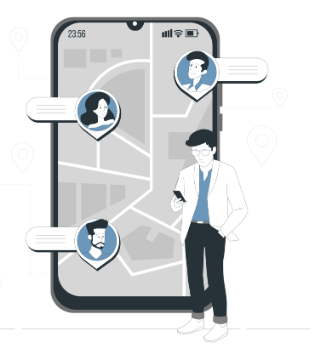
Location tracking on social media can expose real-time movements to strangers or potential threats. Turning off location services or avoiding location-tagged posts enhances privacy and security.
Step 8: Disable Location Sharing Understand the Platform’s Data Collection Policies
Social media platforms collect user data for advertising and analytics. Reviewing privacy policies helps users understand what data is being collected and how it is shared with third parties. Opting out of data-sharing features where possible can further protect personal information.


